WordPress development
The most common WordPress stacks are:
- Astra + Elementor
- GeneratePress + Generate Blocks + CSS
- Kadence + Kadence Blocks + CSS
While developing WordPress websites, I frequently use plugins like Yoast SEO, Simple CSS & JS, Social Icons, WooCommerce, Amelia Booking. I made my first YouTube video about adding PayPal to the WooCommerce plugin in a WordPress site! You can see it here. In order to deepen my expertise in the field of paying services integration with the plugin, I created a test eCommerce shop with WordPress and WooCommerce. I placed a test order and used Stripe test account to make a test payment with a visa test card 4242. It’s amazingly easy to set it up from a web development perspective. One of the big challenges as a technology professional is to know the laws, taxes and payment mechanisms applicable to the country where the client is making the business. Another pro of WooCommerce is lost password functionality out of the box, which works great as well.
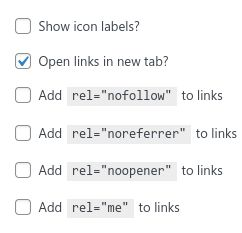
The social media icons plugins in WordPress lets you open links in new tab, and also add various relationships for the links in HTML. The options are nofollow, noreferrer, noopener, me. Let’s unpack them one by one. Nofollow means the SEO value is not passed to the linked website. If you have a wordpress site and you want to advertise your Facebook or Instagram website, I see no reason to add nofollow because you want to signal to the search engines as much as possible that your website contains relevant information. Noreferrer is a privacy concern, it’s a matter of personal believes. noopener that one is important for security reasons and should be checked if open links in new tab is checked. The plugin creator lets the site developer decide if it should or should not be added, and it’s not a critical issue, nevertheless it should be checked. rel=”me” is relevant pretty much only on decentralized social media networks like Mastodon. Facebook and Instagram have their own identity discovery mechanisms.
A website creator that chooses Elementor doesn’t have to use CSS, Elementor is good for content-heavy websites, especially in the Pro version, and particularly it’s an easy-starter for beginners. Even if one decides to stop Pro version subscription, nothing breaks, which is the case with every WP plugin anyway.
GeneratePress and Kadence stacks are more cleanly structured and are easier to maintain long-term, although basic knowledge of CSS is required. It’s the best choice for developers who want to maintain the website for a longer time. A plugin that enables adding styling the website without the headache of switching between the themes is Simple Custom CSS & JS.
I added a Kadence form inside of my footer, so that a user can subscribe to a newsletter. I added the form using Appearance | Customize | Widghets | Footer Widget 2. I have 2 footer widgets, because I want them to take 75% and 25% of the footer width content respectively. Of course I configured the flexbox using CSS, setting display:flex on the selector .footer-widgets .inside-footer-widgets and flex: 3, and flex: 1 on the children thereof. flex: 3 is a shorthand of flex: 3 1 0%, which in turn of course means that the positive free space is equal to the whole footer width, and proportion of the widgets inside of the flexbox should be 3:1, hence I get my desired 75% 🎲. Because of the TinyMCE/Full Site Editing (FSE) legacy in WordPress, the Customizer is limited and doesn’t let me to configure my form which consists of the email and the button that the user can use to subscribe for the newsletter. FSE gives a more advanced configuration possibility in Appearance | Widgets. WordPress spaghetti is one of the biggest challenges for web devs. As a programmer, although there’s a structural tendency of perfectionism related to code, every semicolon, tabulator, const constexpr int & and parentheses, especially in languages like C++ or Java that programmers are involved with.
Yoast SEO gives results of the analysis based on outdated or irrelevant rules. Google abandoned keyphrase density years ago. Those rules are helpful when identifying the problems in readability of the text, but they shouldn’t be blindly regarded as must fix.